



How to Recognize Phishing Emails and Avoid Online Scams
Phishing tricks you into trusting a fake request before you can verify it. Knowing the warning signs and what to do after clicking can protect your accounts.
On this page28
- What Is a Phishing Message?
- 9 Warning Signs of a Phishing Email or Message
- 1. It creates urgency or threatens a consequence
- 2. It asks for sensitive information
- 3. The sender identity does not add up
- 4. The link leads somewhere unexpected
- 5. It includes an unexpected attachment or download
- 6. It offers something unusually good—or demands an unusual payment
- 7. It asks you to move the conversation or keep it secret
- 8. It does not fit the situation
- 9. It bypasses the service's normal process
- How to Check a Suspicious Link Safely
- What to Do If You Receive a Phishing Message
- What If You Already Clicked a Link?
- If you opened the page but entered nothing
- If you entered your password or verification code
- If you entered bank or payment information
- If you downloaded a file or installed an application
- How to Reduce Your Risk of Phishing
- Frequently Asked Questions
- Can a phishing email look completely real?
- Does HTTPS mean a link is safe?
- Should I open a suspicious email to report it?
- What if I clicked but did not type my password?
- Can spelling mistakes prove that a message is phishing?
- Does two-factor authentication stop phishing?
- How do I report a phishing message?
- Conclusion
Phishing is a type of online scam in which someone pretends to be a trusted person or organization to trick you into revealing information, opening a harmful file, sending money, or visiting a fraudulent website. Phishing can arrive by email, text message, social media direct message, phone call, or QR code. The safest response to an unexpected message that asks you to act is to pause, verify the request through a separate trusted channel, and avoid using the links or contact details inside the message.
What Is a Phishing Message?
A phishing message is designed to look legitimate while steering you toward an unsafe action. The sender may impersonate a bank, delivery company, government agency, workplace, social platform, online shop, or someone you know. The goal may be to steal a password or payment detail, collect personal information, persuade you to transfer money, or get you to download malware.
Not every phishing attempt contains spelling mistakes or looks obviously suspicious. Some messages copy a real company's design and logo, use information found online to sound convincing, or imitate a real conversation. Good grammar and familiar branding are not proof that a message is genuine.
Phishing can take several forms:
| Signal | Phishing Email Trap | Legitimate Company Email | Safe Action |
|---|---|---|---|
| Sender Address | Lookalike domain (support@paypa1-alerts.com) | Exact verified domain (@paypal.com) | Inspect full email header |
| Tone & Urgency | 24-hour account deletion threat | Neutral notice with standard timeline | Open official app directly |
| Links & Buttons | Shortened URL or mismatched hover domain | HTTPS link matching official domain | Never enter credentials via email link |
| Attachments | Unexpected .zip, .html, or .iso invoice | Expected PDF or portal notification | Scan or verify via separate channel |
The delivery method may change, but the key warning is the same: someone is trying to make you trust a request before you have independently verified it.
9 Warning Signs of a Phishing Email or Message
1. It creates urgency or threatens a consequence
A message may claim that your account will be suspended, a payment will fail, a package will be returned, or a fine will increase unless you act immediately. Urgency is used to make you react before checking whether the story is true. A real service can send urgent notices, so urgency alone does not prove fraud—but it is a reason to verify independently.
2. It asks for sensitive information
Treat unexpected requests for passwords, one-time verification codes, PINs, full payment-card details, or identity documents as a serious warning. Do not disclose these details in reply to a message or through a link you did not independently verify. When a message claims that a bank or service needs information, open the official app or type the known website address yourself.
3. The sender identity does not add up
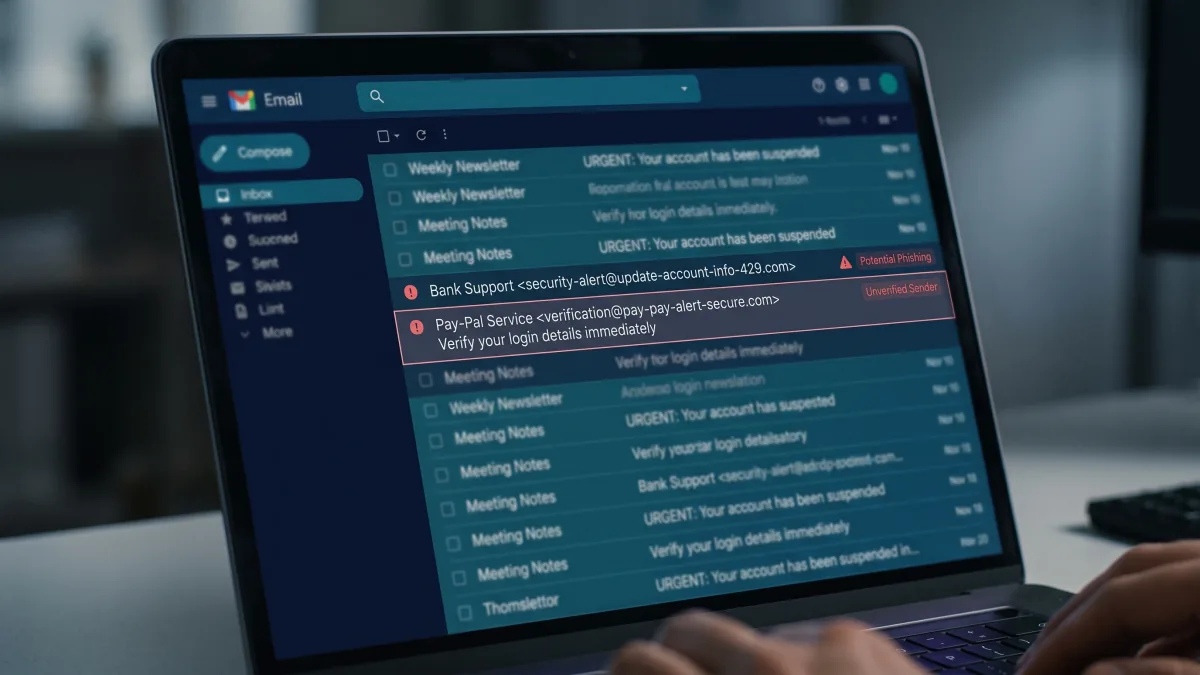
Check the complete sender address or account, not just the display name, logo, profile photo, or signature. Look for misspellings, unexpected domains, unusual subdomains, and small changes in the organization name. However, sender details can be misleading or spoofed, so an address that looks plausible is not conclusive proof of authenticity.
4. The link leads somewhere unexpected
On a desktop computer, you can often hover over a link to preview its destination without opening it. On a phone, do not tap the link to investigate; instead, go to the service through its official app or by entering a known address manually. Be cautious of shortened links, strange domain names, and addresses that add a trusted brand name to a longer, unrelated domain.
For example, a URL such as https://accounts.example.com.login-check.example.net/ is hosted under example.net, not example.com. This is an illustrative example, not a real login website. Also remember that https:// and a padlock indicate an encrypted connection; they do not prove that a site is honest.
5. It includes an unexpected attachment or download
Be suspicious of unexpected invoices, delivery documents, shared files, voice messages, or archive files—especially when the sender asks you to enable macros, install an application, or bypass a security warning. Confirm the file with the sender through a separate channel before opening it. Do not disable your device's security protections to view an unsolicited file.
6. It offers something unusually good—or demands an unusual payment
Unexpected prizes, refunds, job offers, investment opportunities, or discounts can be used as bait. Be wary if you must pay a fee to receive a supposed prize, transfer money urgently, buy gift cards, or send cryptocurrency to resolve a problem. Verify offers independently using the company's official website or support channel.
7. It asks you to move the conversation or keep it secret
A supposed manager, supplier, family member, or support representative may ask you to switch to a new number, use a personal email address, keep the request confidential, or bypass normal approval. For payment or account changes, verify the request through a communication channel you already trust and follow your organization's normal process.
8. It does not fit the situation
Ask yourself whether you have an account with the company, recently ordered the package, requested the password reset, or expected the attachment. A message about an action you did not take deserves extra scrutiny. Attackers can also use real details from public profiles or leaked information, so a message that mentions your name or workplace is not automatically genuine.
9. It bypasses the service's normal process
Be cautious if a message directs you away from the official app, asks you to install remote-access software, requests a login code, or tells you to ignore browser warnings. If you are concerned about a security alert, check the account by opening the official app or site independently. Google recommends checking the sender, links, warnings, and requests for private information.
How to Check a Suspicious Link Safely
Use this sequence rather than testing the link by opening it:
- Do not click it. Do not use the message's link, button, QR code, or phone number to investigate its own claim.
- Verify the sender through a separate channel. Use a saved contact, a number on your bank card, the official app, or a website address you already know. Do not rely on caller ID or the contact details in the suspicious message.
- Inspect the full destination when safe to do so. On a desktop, hover to preview the URL. Check the actual domain rather than the words displayed on the button. If you cannot confidently identify the domain, do not proceed.
- Navigate independently. Open the company's app or type its known address yourself and look for the same alert in your account.
- Use security warnings as a stop sign. Do not ignore warnings from your browser, email provider, or device. A clean result from a link-checking service is not a guarantee that a link is safe, especially for newly created or targeted scam sites.
- Report and delete the message. Use your email or messaging service's phishing-reporting feature and then remove the message if appropriate.
What to Do If You Receive a Phishing Message
Do not reply, click, download, scan its QR code, or use an unsubscribe link inside a message that you suspect is fraudulent. Report it through the email or messaging service's built-in reporting feature, then delete it. If it appears to come from your bank, employer, delivery service, or another organization you use, contact that organization through a verified channel and ask whether the message is real.
In Gmail, open the message, use the More menu, and select Report phishing; the exact controls may differ by device or interface version. Reporting helps the provider investigate and improve its filters, although it does not guarantee that every similar message will be blocked.
Reporting channels depend on your country. In the United States, consumers can report fraud to the FTC at ReportFraud.ftc.gov and forward phishing email to the Anti-Phishing Working Group at reportphishing@apwg.org. Elsewhere, use the relevant national cybercrime or consumer-protection authority and the impersonated organization's official reporting channel.
What If You Already Clicked a Link?
Clicking a link does not always mean that your device or account has been compromised, but you should respond according to what happened.
If you opened the page but entered nothing
Close the page. Do not download anything or approve a notification or permission request. Update your browser and operating system, and review any file that may have downloaded. If a file ran, the device displayed a security warning, or you notice unusual behavior, run the security tools provided by your operating system or a trusted security vendor.
If you entered your password or verification code
Use a trusted device and go directly to the legitimate service—not through the message—to change the password immediately. If the password was reused elsewhere, change it on those accounts too. Sign out other sessions where the service supports it, review recent sign-ins and account-recovery details, and enable a strong additional authentication method such as a passkey or multi-factor authentication. If you shared a one-time code, treat the account as potentially at risk and contact the provider using its official support channel.
If you entered bank or payment information
Contact the bank or payment provider immediately using the number on your card or its official app. Ask whether the card or account should be blocked, replaced, or monitored, and dispute transactions you did not authorize. Act quickly; reporting processes and legal protections differ by country and payment method.
If you downloaded a file or installed an application
Do not open it again. Run a security scan using trusted software and follow the device manufacturer's guidance. If you granted remote access to a stranger, installed remote-control software at their request, or believe the device is actively compromised, disconnect it from networks when practical and seek help through official support from a separate trusted device. Do not call a support number shown in a suspicious pop-up.
How to Reduce Your Risk of Phishing
Frequently Asked Questions
Can a phishing email look completely real?
Yes. Phishing messages can copy a real organization's logo, wording, and layout or use details about you to sound convincing. Do not judge a message only by its appearance or spelling; verify the sender and request independently.
Does HTTPS mean a link is safe?
No. HTTPS encrypts the connection between your browser and the site, but scammers can also use HTTPS. Check that you are on the correct domain and that the request is legitimate.
Should I open a suspicious email to report it?
You may need to select a message to use your provider's reporting function, but do not click its links, open attachments, reply, or follow its instructions. Use the provider's built-in Report phishing option where available.
What if I clicked but did not type my password?
Close the page and avoid downloading files or granting permissions. Update your software, check whether a download occurred, and run a trusted security scan if you opened a file or noticed suspicious behavior. If you entered information, follow the relevant account or payment recovery steps above.
Can spelling mistakes prove that a message is phishing?
No. Poor grammar can be a warning sign, but modern scam messages may be well written. Likewise, a professional-looking message is not proof that it is real. Verify unexpected requests through an independent channel.
Does two-factor authentication stop phishing?
Not every method does. Attackers may steal a password and a manually entered one-time code in real time. Multi-factor authentication still adds valuable protection, while passkeys and properly implemented security keys can offer stronger phishing resistance.
How do I report a phishing message?
Use the reporting feature in your email or messaging service, report it to the impersonated organization, and contact the appropriate national cybercrime or consumer-protection authority if needed. The correct government reporting channel depends on your location.
Conclusion
The most reliable way to handle a suspicious message is to slow down and verify it independently. Check the full sender identity, treat unexpected links and attachments carefully, and never provide passwords, payment details, or verification codes just because a message looks official. If you already interacted with a suspected scam, secure the affected account or payment method promptly and report the incident through trusted channels.
Sources
- Federal Trade Commission — How To Recognize and Avoid Phishing Scams
- Federal Trade Commission — Protect Yourself From Phishing Scams
- Google Gmail Help — Avoid & report phishing emails
- Google Gmail Help (Arabic) — طريقة تجنّب الرسائل الإلكترونية التي تهدف إلى التصيّد الاحتيالي والإبلاغ عنها
- Microsoft Support — Protect yourself from phishing
- Saudi National Cybersecurity Authority — وقّف 5 ثوانٍ — لا تفتح مجال
- Egypt Consumer Protection Agency — النصب عن طريق البريد
- CISA — Secure Our World
Tags: Two-Factor AuthPrivacy TipsHow-ToTroubleshooting